
Menu
Search...

Wintriss ShopFloorConnect (SFC) production tracking software is designed to collect and organize production data from the shop floor. It eliminates the three common problems with manually collected data: untimeliness, inaccuracy, and bias. Considering that raw data forms the basis for all subsequent production reports – and that important decisions are made based on those reports – any problems with the initial data collection can start a ripple effect that results in a negative impact on your business. Good measurements are the basis for making improvements.
ShopFloorConnect® OEE and Shop Floor Data Collection Software collects downtime and production efficiency data from every machine in your factory, displays it in real time, and produces indispensable manufacturing reports (including detailed OEE reports) in a variety of formats.
This scalable and flexible production monitoring system is well-suited for manufacturers in a variety of industries, including discrete manufacturing, metalforming, metal fabrication, food, beverage and packaging, and provides superior OEE calculations that accurately report overall equipment effectiveness for the most complex manufacturing environments.
ShopFloorConnect makes shop floor data collection easier than ever before. This production tracking software provides machine downtime and manufacturing efficiency reports via a web browser and e-mail and can integrate with existing ERP systems.
SFC works with the Wintriss SmartPAC® press automation controls, the SMI 2 machine monitoring interface, which can be applied to most machine types, and many existing PLC’s.
ShopFloorConnect comes factory-configured to talk to Wintriss SmartPAC 1 & 2 and SmartPACPRO press automation controls to establish cycle counts, machine speed, and run time – down time. It can also monitor many data points, quality metrics, and down time causes that SmartPAC monitors.
Additionally, we offer the SMI 2 which is the fastest way to connect virtually any machine to the SFC Factory Reporting Software. The SMI 2 is network-ready and factory configured to drop right in to your existing ShopFloorConnect installation and begin collecting data.
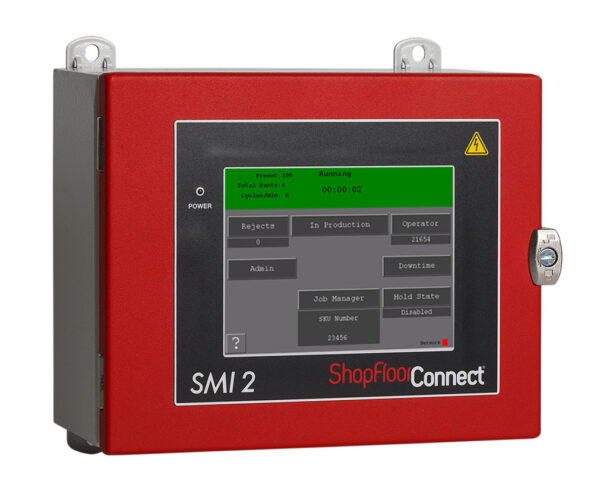
The SMI 2 automatically tracks uptime and production count data from any machine and provides it to ShopFloorConnect. The SMI 2 features a user configurable machine-specific downtime reason list so that operators can indicate the reason for each significant machine stoppage with minimal effort.
Job and operator information can be entered into the SMI 2 using the on-screen keypad or by a bar code or other scanner connected to one of the SMI 2’s on-board USB ports. Job tracking enables ShopFloorConnect to apply ideal production rates specific to a part or process, which makes OEE calculations more accurate.
The SMI 2 features a downtime selection menu that takes full advantage of the touch-screen interface to streamline operator input. The SMI 2 also has an additional “Setup” input that allows ShopFloorConnect to appropriately log any time spent doing troubleshooting and setup even if the machine is cycled.
All data is available to you in real time.
No Special Client Software is Needed
Many currently available shop floor data collection systems require you to install special software on all computers that need to access the shop floor production data. This is not the case with ShopFloorConnect. If your computer has a web browser and email client, you have all you need to take full advantage of ShopFloorConnect’s production tracking capabilities – even from remote locations (provided you have remote access to your network).
The scheduling interface feature in ShopFloorConnect production tracking software allows you to create a queue of jobs to run in each machine. You can either import a schedule from your existing ERP software or use ShopFloorConnect’s web browser interface to select the appropriate jobs and the quantity of parts required. You may optionally enter a job number and/or due date for each job.
Once a schedule is created, ShopFloorConnect automatically sends the “next job” information to the Machine Interface When it’s time to run the next job, the machine operator simply selects “Load Next Job” and the information, including the good parts counter preset, is retrieved from the ShopFloorConnect shop floor management system. The top item in the schedule is then automatically “consumed” and the queue moves up.
ShopFloorConnect production tracking software predicts the completion time/date for each job in the queue with an industry-best algorithm that analyzes real-time as well as historical changeover and production data. ShopFloorConnect alerts you whenever job completion is due to occur later than the due date. The scheduling interface of this shop floor data collection system features a simple intuitive interface that allows you to edit job parameters and reposition jobs within the queue.
The main goal is to reduce inefficiencies, particularly downtime. Even a minimal effort to reduce downtime can lead to substantial cost savings. Use ShopFloorConnect’s Downtime Tracking Software Savings Calculator” to see what your results might be.
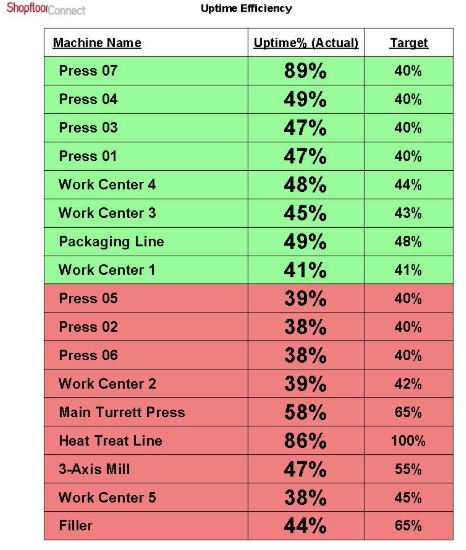
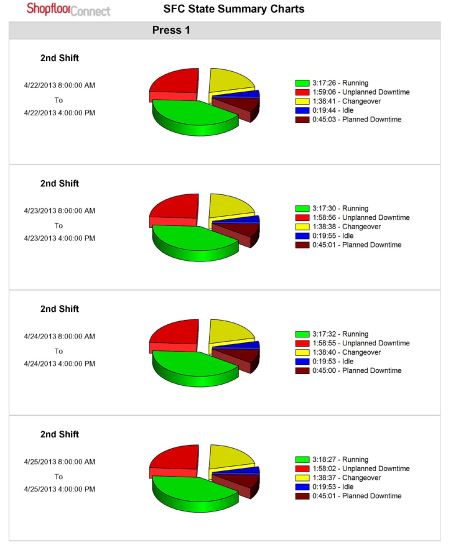
Wintriss production monitoring software includes a wide range of useful report templates, including:
© 2004-2024